Camera and Upload Capture
Take a menu photo or upload images of a longer menu, then send them through the AI menu understanding pipeline.
AI-powered menu translator
Take or upload menu photos. Better Menu uses AI to extract dishes, translate names and descriptions, and explain taste, ingredients, spice, and ordering watch-outs.
Scan to open Better Menu on your phone

Built for travelers, food lovers, and curious eaters
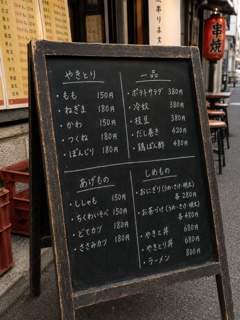
Take a menu photo or upload images of a longer menu, then send them through the AI menu understanding pipeline.
Translate dish names, descriptions, and categories into your selected language while preserving the original menu text.
Understand what a dish is, how it may taste, likely ingredients, texture, richness, and familiar analogies.
See spice level, beginner score, and likely cautions such as raw food, bones, shellfish, alcohol, nuts, or strong flavors.
Translate menu understanding into English, Simplified Chinese, Traditional Chinese, Japanese, Korean, French, German, Spanish, Italian, Vietnamese, or Thai, with home-region context for more familiar explanations.
もも · 150円
Similar to a small, juicy chicken kebab you might find at a backyard BBQ.
Juicy, meaty, and savory with a satisfying smoky char.
Watch out: Served piping hot. Bamboo skewers can be sharp at the tip.
Standard camera translators usually focus on replacing words. Better Menu is built for restaurant menus, so it reconstructs dishes, explains what they are, shows practical taste and texture notes, and adds ordering context.
Better Menu is designed for foreign-language restaurant menus and can output explanations in English, Simplified Chinese, Traditional Chinese, Japanese, Korean, French, German, Spanish, Italian, Vietnamese, or Thai.
No. Better Menu also provides dish explanations, familiar analogies, taste and texture notes, spice levels, beginner scores, likely ingredients, and ordering watch-outs.
Yes. Better Menu is currently free to use.